
You are using an out of date browser. It may not display this or other websites correctly.
You should upgrade or use an alternative browser.
You should upgrade or use an alternative browser.
The MyLink Master thread
- Thread starter AxelRipper
- Start date


ThatTmoGuy
New member
It doesnt suck, this is a whining list.
As with any gadget there are quirks you dislike, but none are serious issues.
Take it with a grain of salt.
I agree and disagree at the same time, you have to deal with quirks of a new product and there will always be bugs in new software. But some of these things should not be an issue since it appears to be running on an old platform
If it is really running windows CE it's garbage. FFS it's 2012 why would you release some new piece of tech with an OS that's already 7 years old! If it was running Android I'd be all for it.

laborsmith
New member
I have been quite pleased with MyLink, a surprise to me because I expected to have difficulty with the technology.
My first assessment of the original post is that the Apple product seems to be the source of a number of the complaints. One complaint, not resuming using the station last being played when restarting, I have not seen.
I have not noticed the screen being too bright, and given my vision problems, it would seem I of all people would notice. An example: street lights take on a diamond effect, something I adjust to when driving after dark but an indication of the effect bright light has.
I did not buy the RS for MyLink, in fact, if it had been an option I likely would not have had that box checked, but I am pleased that I have it.
Especially pleased because the speaker system is so much improved when compared to the LT w/ connectivity I used to drive.
Laborsmith
My first assessment of the original post is that the Apple product seems to be the source of a number of the complaints. One complaint, not resuming using the station last being played when restarting, I have not seen.
I have not noticed the screen being too bright, and given my vision problems, it would seem I of all people would notice. An example: street lights take on a diamond effect, something I adjust to when driving after dark but an indication of the effect bright light has.
I did not buy the RS for MyLink, in fact, if it had been an option I likely would not have had that box checked, but I am pleased that I have it.
Especially pleased because the speaker system is so much improved when compared to the LT w/ connectivity I used to drive.
Laborsmith

Dragcamaro
New member
I hate that the Sat radio goes back to one. I think if I shut the car off and start it back up soon it remembers it, kinda like how I always have to turn my fog lights on but if you do a quick restart it will keep them on.
I thought the 7 pages of presets was overkill, but the steering wheel controls don't let you skip up and down by the station so I just used all of them on every channel I could possibly see myself listening too.
I also don't like the blank Bluetooth screen, especially since the wheel controls can change songs in google play.
Overall though I'm pretty satisfied with the mylink, the factory setup sounds suprisingly nice, honestly its probably one of the best sound systems GM makes.
I wish I could use voice on my droid though
I thought the 7 pages of presets was overkill, but the steering wheel controls don't let you skip up and down by the station so I just used all of them on every channel I could possibly see myself listening too.
I also don't like the blank Bluetooth screen, especially since the wheel controls can change songs in google play.
Overall though I'm pretty satisfied with the mylink, the factory setup sounds suprisingly nice, honestly its probably one of the best sound systems GM makes.
I wish I could use voice on my droid though

CoHPhasor
Active member
I agree and disagree at the same time, you have to deal with quirks of a new product and there will always be bugs in new software. But some of these things should not be an issue since it appears to be running on an old platform
If it is really running windows CE it's garbage. FFS it's 2012 why would you release some new piece of tech with an OS that's already 7 years old! If it was running Android I'd be all for it.
Because it's super cheap, their programmers are very familiar with it/lazy and neither Google or Apple feels slighted because WCE isn't even close to competition.
(Plus the hardware needed for it is so cheap and small you could run 4 separate machines off of a watch. Lol!)
Believe me, I have some complaints about stupidity in its design, I'll post them later, but in no way are they serious.
(EXCEPT that f***king OnStar is symbiotically linked to it)

Lovehanayo
New member
What's interesting is I had read that apple was trying to become more involved with automakers and have siri more integrated with the cars. This link goes over it. It says ford was the "notable exception" that will not be working with it. Maybe this will be will make the RS more appealing than the fiesta ST (since another thread was talking about fiesta taking over sonic RS sales once it hits next year). http://gigaom.com/apple/apples-siri-assistant-coming-to-2-chevy-cars-in-2013/
Few things:
Bluetooth audio does not pass through metadata with iphones due to an iOS limitation.
SiriusXM defaulting to Channel 1 needs to be reactivated - I think that's what some people said in another thread. Basically you need to push down another activation command, think you can do this from Sirius website.
You can get audio from any iPhone app by starting Pandora and pausing whatever is playing. I do this for spoken driving directions with Apple Maps, Spotify and assorted other iOS apps. I've been able to get it working once without opening Pandora on MyLink first but it might have been a fluke, haven't been able to duplicate it.
When you press the phone button and press again calls the previous person. Hold the phone button down the second time, rather than pressing it, and it will activate Siri.
Bluetooth audio does not pass through metadata with iphones due to an iOS limitation.
SiriusXM defaulting to Channel 1 needs to be reactivated - I think that's what some people said in another thread. Basically you need to push down another activation command, think you can do this from Sirius website.
You can get audio from any iPhone app by starting Pandora and pausing whatever is playing. I do this for spoken driving directions with Apple Maps, Spotify and assorted other iOS apps. I've been able to get it working once without opening Pandora on MyLink first but it might have been a fluke, haven't been able to duplicate it.
When you press the phone button and press again calls the previous person. Hold the phone button down the second time, rather than pressing it, and it will activate Siri.
fieldhouse
New member
Yeah guys, this is just a bitch list. For the most part I'm really happy with MyLink. Hell, my last head unit would only display the first 8 characters of one mp3 tag (you got to choose between around eight, all of them useless with the character limitation)
Some of the stuff is just fun to play with, like the fader/balance control. Operates exactly like it does on the Tesla Model S.
And the stock speakers are good enough that I'll probably wait a few months before swapping them out. And when I do, I will need to drop some serious cash to get a much better clarity/tonality. I actually like them better than the Infinite coaxials I had in my previous car.
I'm actually at the dealership getting reflashed right now so we'll see what the firmware vervion is once they're done and see if anything changes-for better or worse.
Keeping my fingers crossed.
Some of the stuff is just fun to play with, like the fader/balance control. Operates exactly like it does on the Tesla Model S.
And the stock speakers are good enough that I'll probably wait a few months before swapping them out. And when I do, I will need to drop some serious cash to get a much better clarity/tonality. I actually like them better than the Infinite coaxials I had in my previous car.
OK, but it should work with my Nexus 7, right? That's what I was trying to use BT streaming with...Few things:
Bluetooth audio does not pass through metadata with iphones due to an iOS limitation.
Cool. I'll check into that. I figured it was more of a Sirius issue than a GM one.SiriusXM defaulting to Channel 1 needs to be reactivated - I think that's what some people said in another thread. Basically you need to push down another activation command, think you can do this from Sirius website.
Thanks for the suggestion. I'll try it out. I'm also wondering if I just switch to Bluetooth audio if the driving directions will come through. The problem with either of those workarounds is you have to leave it on Bluetooth, it won't auto switch from another source and interrupt the current playback so you'd be listening to silence 90% of the time unless you're following some pretty chaotic directions. Not very useful on longer trips.You can get audio from any iPhone app by starting Pandora and pausing whatever is playing. I do this for spoken driving directions with Apple Maps, Spotify and assorted other iOS apps. I've been able to get it working once without opening Pandora on MyLink first but it might have been a fluke, haven't been able to duplicate it.
yeah, I know you can do it that way. My point was that the manual tells you otherwise. It says press, not hold down. Probably just another "engineering defect"When you press the phone button and press again calls the previous person. Hold the phone button down the second time, rather than pressing it, and it will activate Siri.
I'm actually at the dealership getting reflashed right now so we'll see what the firmware vervion is once they're done and see if anything changes-for better or worse.
Keeping my fingers crossed.
2012 LTZ MyLink Upgrade/Bluetooth Problems
Was considering upgrading the head unit in my now 6 month old 2012 LTZ turbo with the new MyLink system. I've visited two parts departments at the dealerships in my area. Neither even knew what 'MyLink' is. So, I contacted GM 'Infotainment support' and had a live chat with, "Yolanda". After giving her the last 8 of my VIN, I asked the possibility-price-part number for MyLink, and in one statement she said: the MyLink system definitely would not work in my 2012 Sonic; didn't know the part number of the head unit; told me that I should contact my dealership to get MyLink part number and to get it installed; and that dealerships wouldn't install the MyLink head unit because of the cost involved (which she wouldn't/couldn't disclose!)
The sound of the original head unit is fine, but the Bluetooth in my Sonic barely works for calls. 'Voice Commands' don't work at all, and I have to use an AUX cable to play music since it won't stream (via two Android phones, or my two iPods.) Don't know if Bluetooth is a separate system (nor do the dealerships), but when I took it in for the Bluetooth problem (among many others), after waiting for 3 hours (WITH an appointment! 0.3 hours/18 minutes charged for labor, under warranty, thankfully!) the last service department manager told me, "Bluetooth just doesn't work in this car. Nothing can be done about it." A buddy that lives in another state and has an identical Sonic, has the same issues with dealerships/service departments/Bluetooth (calls and streaming) using an iPhone 4G, and now a new iPhone 5, so I'm guessing that it's either bad hardware, and/or software.
Had this idea knowing that an upgrade would come out of my pocket, and be pricey, but wanted it to look stock. But, after all of the other problems I've had with this car, the service departments, parts departments, and now GM, itself, I guess I'll either go aftermarket, or just sell the damn thing!
Unacceptable experiences considering a company that was brought back from bankruptcy. GM could learn a lot from Fiat in the area's of quality/service/customer service. But, especially from Fiat's 'Blue&Me' system, which is intuitive, performs more functions, and works flawlessly (like the rest of the car!)
Was considering upgrading the head unit in my now 6 month old 2012 LTZ turbo with the new MyLink system. I've visited two parts departments at the dealerships in my area. Neither even knew what 'MyLink' is. So, I contacted GM 'Infotainment support' and had a live chat with, "Yolanda". After giving her the last 8 of my VIN, I asked the possibility-price-part number for MyLink, and in one statement she said: the MyLink system definitely would not work in my 2012 Sonic; didn't know the part number of the head unit; told me that I should contact my dealership to get MyLink part number and to get it installed; and that dealerships wouldn't install the MyLink head unit because of the cost involved (which she wouldn't/couldn't disclose!)
The sound of the original head unit is fine, but the Bluetooth in my Sonic barely works for calls. 'Voice Commands' don't work at all, and I have to use an AUX cable to play music since it won't stream (via two Android phones, or my two iPods.) Don't know if Bluetooth is a separate system (nor do the dealerships), but when I took it in for the Bluetooth problem (among many others), after waiting for 3 hours (WITH an appointment! 0.3 hours/18 minutes charged for labor, under warranty, thankfully!) the last service department manager told me, "Bluetooth just doesn't work in this car. Nothing can be done about it." A buddy that lives in another state and has an identical Sonic, has the same issues with dealerships/service departments/Bluetooth (calls and streaming) using an iPhone 4G, and now a new iPhone 5, so I'm guessing that it's either bad hardware, and/or software.
Had this idea knowing that an upgrade would come out of my pocket, and be pricey, but wanted it to look stock. But, after all of the other problems I've had with this car, the service departments, parts departments, and now GM, itself, I guess I'll either go aftermarket, or just sell the damn thing!
Unacceptable experiences considering a company that was brought back from bankruptcy. GM could learn a lot from Fiat in the area's of quality/service/customer service. But, especially from Fiat's 'Blue&Me' system, which is intuitive, performs more functions, and works flawlessly (like the rest of the car!)
ThatTmoGuy
New member
Bluetooth is controlled by the same module that does OnStar its behind the passenger airbag under the dash. Tell them to check the connections to that module and/or replace it. It's already been discussed that a 2012 Sonic would not be able to receive the MyLink as an upgrade because the BCM would not recognize it nor would the bluetooth/OnStar module.
laborsmith
New member
Ofer on Camaro5 has figured out how to put MyLink on 2010 and 2011 Camaros, for those who want oem. He has the parts but has not put them together so far. Looking at the individual prices, it looks like $2500 plus labor and that does not include a separate GPS antenna which the 2010 needs.
Although the Camaro MyLink is more sophisticated, I doubt if Sonic MyLink parts would be less expensive.
Point: it probably can be done. But not inexpensively.
Also, dealers will not be allowed to do it. Ofer has upgrades to add HUD to Camaro vehicles that did not have them. Chevy dealers will tell you HUD can not be added although there are a bunch of Camaros that did not have HUD when they left the factory that now have oem HUD installed.
Laborsmith
Although the Camaro MyLink is more sophisticated, I doubt if Sonic MyLink parts would be less expensive.
Point: it probably can be done. But not inexpensively.
Also, dealers will not be allowed to do it. Ofer has upgrades to add HUD to Camaro vehicles that did not have them. Chevy dealers will tell you HUD can not be added although there are a bunch of Camaros that did not have HUD when they left the factory that now have oem HUD installed.
Laborsmith
fieldhouse
New member
My recommendation, before you spend any more time trying to find a part number go to a dealership and try bluetooth streaming on a 2013 model. You may be very surprised with the results.
And voice commands don't work with MyLink on the Sonic / Spark either. All you get is passthru voice control of your bluetooth connected device.the Bluetooth in my Sonic barely works for calls. 'Voice Commands' don't work at all
by "enhanced voice recognition" they mean Nuance voice commandsGM said:
I've had similar success with streaming music over bluetooth with MyLink from my Nexus 7 tablet. The audio stuttered, sped up, slowed down, and was garbled even after boosting the priority of audio and disabling everything else I could. I gave up and used aux in since the screen wasn't displaying any metadata from the bluetooth stream. I'd prefer to use bluetooth streaming (if it worked.) for hands-free device control and audio track info display.I have to use an AUX cable to play music since it won't stream (via two Android phones, or my two iPods.)
...
A buddy that lives in another state and has an identical Sonic, has the same issues with dealerships/service departments/Bluetooth (calls and streaming) using an iPhone 4G, and now a new iPhone 5, so I'm guessing that it's either bad hardware, and/or software.
Last edited:

Wreckless BOOM
New member
I have a 2013 with the mylink it had major problems and had to be replaced two weeks after I bought the car, the unit itself I was told was around 1500 dollars not including labor is a great deck but I have a similar one in my other car with same functions for around 400 dollars( bluetooth, xm, navigation modules added about 900 total ). The reason its so spendy is that is also controls lighting and other options of your car! IMO not really worth it if its not already installed!!

RS Turbo
New member
First off the 2012 Sonic uses the Onstars VCIM for Bluetooth phone only. The VCIM can not transfer the large amount of data for music streaming.
All vehicles that have the ability to Stream music by bluetooth have the bluetooth chipset located internal to the radio. It has no issues handling both phone and music because it was designed for it. It only uses the Mic from Onstar for picking up your voice for bluetooth phone and passing that to the radio.
Not all Mylink radios are bluetooth music streaming. This depends on the models options.
Example is the Equinox ,Malibu and Cruze can be ordered with option codes UFU (color radio with touch screen, Bluetooth phone located in the Onstar module) , Mylink UFU+UP9 options (color connected radio, Bluetooth for phone and music streaming done by the radio) and Last is the Nav option UHQ, This is the Mylink Nav radio with phone bluetooth and audio streaming.
If you wanted a Mylink in the Sonic you should have waited for the 2013 models. GM and no literature ever stated the 2012 Model year would be upgradeable
All vehicles that have the ability to Stream music by bluetooth have the bluetooth chipset located internal to the radio. It has no issues handling both phone and music because it was designed for it. It only uses the Mic from Onstar for picking up your voice for bluetooth phone and passing that to the radio.
Not all Mylink radios are bluetooth music streaming. This depends on the models options.
Example is the Equinox ,Malibu and Cruze can be ordered with option codes UFU (color radio with touch screen, Bluetooth phone located in the Onstar module) , Mylink UFU+UP9 options (color connected radio, Bluetooth for phone and music streaming done by the radio) and Last is the Nav option UHQ, This is the Mylink Nav radio with phone bluetooth and audio streaming.
If you wanted a Mylink in the Sonic you should have waited for the 2013 models. GM and no literature ever stated the 2012 Model year would be upgradeable
Last edited:
fieldhouse
New member
Reflash is done, was able to get in today instead of leaving the car overnight tonight. Seems to have blown up my Sat radio, maintained my BT pairing, but lost the clock time. How's that for random?
Summarized issues:

My MyLink reflash did a number on SiriusXM. Doesn't work at all now. Hoping that the re-config will eliminate the default to Channel 1.

Overall though I'm pretty satisfied with the mylink, the factory setup sounds suprisingly nice[/Quote]totally agree. I added an Infinity BassLink which can be had for under $175.
Summarized issues:
- USB/mp3 screen crash: still there. Assuming a corrupt mp3 or two.
- Can't change the # of favorites pages (7): no change.
FAV 1-2-3 referenced is only on UM7 (AM-FM Radio) and UH7 (Radio with CD/USB) Infotainment Systems - not on UF7 (MyLink)Sonic Owners Manual page 7-16 said:To set up the number of favorites
pages: 1. Press and hold FAV 1-2-3 until - Favorites seem randomly populated: confirmed. I did a factory radio reset after I got the car back and all of the favorites were populated by a mixture of random, partially invalid AM, FM and XM radio stations. I did try setting a bunch of favorites to the same station and it works but seems pretty pointless.
- Sirius XM defaults to channel 1 if playing another SiriusXM station when car is turned off: can't test until I get SiriusXM working again after the reflash.
- Unable to disable audio sources (AM, FM, XM): no change
- Unable to stream audio from a 2nd BT device: confirmed
Sonic Owners Manual page 7-31 said:Only one paired cell phone can be connected to the Bluetooth system at a time. If multiple paired cell phones are within range of the system, the system connects to the first available paired cell phone in the order that they were first paired to the system.
- BT passthru lag: no change
- Steering Wheel phone button functionality: no change
This should work according to GM infotainment (and page 7-40 in the Owners Manual):
GM Infotainment said:Gabriel: Hello! Thank you for contacting Chevrolet Infotainment. My name is Gabriel , how may I help you today?
Customer: Hi, I'm having some problems with the MyLink stereo on my new Chevy Sonic. Is there a trick to getting voice recognition to start?
Gabriel: I'm sorry your are having those issues, but we can get that working for you.
Gabriel: You first have to press the face/phone button on your steering wheel.
Gabriel: Then tell the vehicle a command.
Customer: I've tried pushing the face/phone button on the steering wheel but it doesn't seem to be working. if the stereo is turned off, nothing happens. If the stereo is on, it switches to the telephone screen and doesn't say anything. The manual says it is supposed to beep and say "Ready" but nothing happens.
Gabriel: What type of command are you trying to tell the system?
Customer: I was just trying to walk through the bluetooth phone pairing. I've tried "bluetooth" and "pair", "help"...doesn't seem to respond at all.
Gabriel: If you are trying to set up bluetooth, you would have to press the button twice, or hold it down for 2 seconds, and it should respond with 'Ready"
Customer: oh. ok. I'll see if that makes a difference. thanks!
Gabriel: Well another option is to try and put it in manually, through the MyLink System.
Gabriel: Then try the voice commands after that.
Gabriel: Such as 'Call Greg" - USB devices: confirmed that two devices are supported. The iPhone can be attached and accessed as a third USB device and shows up under the USB menu. Any additional USB devices attached after the first two are not recognized and must be disconnected / reconnected after an existing recognized device is disconnected. Pretty straightforward, although the 2 device limit seems a bit arbitrary. Assuming there aren't already two recognized USB devices attached, attaching another device causes MyLink to immediately start playing the last played song on that particular USB device (kinda cool).
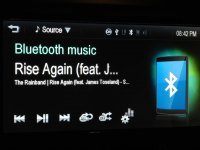
- Bluetooth audio streaming metadata doesn't appear on the screen: only for Android devices. iPhone displays song info (see attached screenshot below)
- Can't skip to next grouping (album, folder, playlist): no change
- FF/REW speed is constant at a 10 second skip every 1 second the toggle is held. So, to skip forward 30 minutes you would need to hold the toggle for 3 minutes solid. forget it. just use the scrub bar. The scrub bar is awesome.
- Stitcher audio app playback speed changing: no change
- Turn-by-turn nav voice proimpts: does work with the iPhone if the audio source on MyLink is set to bluetooth. You can listen to other audio off your iPhone via bluetooth streaming and the navigation prompts will pop in over the music.
- MyLink screen brightness: no change
I think that's just because the iPhone is generally what I have with me. In some cases, BT streaming for instance, the iPhone apparently works better than Android devices. That surprised me.My first assessment of the original post is that the Apple product seems to be the source of a number of the complaints.
I'm really light sensitive so it may not be a common complaint. Or maybe they fixed this on the RS.I have not noticed the screen being too bright, and given my vision problems, it would seem I of all people would notice. An example: street lights take on a diamond effect, something I adjust to when driving after dark but an indication of the effect bright light has.
you're right. There is some kind of short-term memory that keeps MyLink in something close to an instant on mode and it will remember your settings.I hate that the Sat radio goes back to one. I think if I shut the car off and start it back up soon it remembers it
My MyLink reflash did a number on SiriusXM. Doesn't work at all now. Hoping that the re-config will eliminate the default to Channel 1.
Turns out this isn't exactly the case... If you use the 2nd tab at the bottom of the AM or FM tuner pages (labeled "AS", stands for autostore) you can use the steering wheel controls to change between stations. But, autostore appears to have been written by an inebriated developer and the stations don't appear in anything close to numerical order (maybe ordered by call sign? didn't check that)I thought the 7 pages of presets was overkill, but the steering wheel controls don't let you skip up and down by the station so I just used all of them on every channel I could possibly see myself listening too.
This one surprised me. No audio details displayed with my Nexus 7 but it WORKS with my iPhone 4s. What's up with that? Maybe it's not quite as iTarded as I thought it was.I also don't like the blank Bluetooth screen, especially since the wheel controls can change songs in google play.
Overall though I'm pretty satisfied with the mylink, the factory setup sounds suprisingly nice[/Quote]totally agree. I added an Infinity BassLink which can be had for under $175.
I'm not getting the whole no voice on Andriod thing... Don't you just need a voice control app like Alice to use voice control? Shouldn't be any different than BT passthru on an iPhone to control Siri...I wish I could use voice on my droid though
Attachments
-
 IMG_1411.jpg80.5 KB · Views: 731

Chevrolet Customer Care
New member
Was considering upgrading the head unit in my now 6 month old 2012 LTZ turbo with the new MyLink system. I've visited two parts departments at the dealerships in my area. Neither even knew what 'MyLink' is. So, I contacted GM 'Infotainment support' and had a live chat with, "Yolanda". After giving her the last 8 of my VIN, I asked the possibility-price-part number for MyLink, and in one statement she said: the MyLink system definitely would not work in my 2012 Sonic; didn't know the part number of the head unit; told me that I should contact my dealership to get MyLink part number and to get it installed; and that dealerships wouldn't install the MyLink head unit because of the cost involved (which she wouldn't/couldn't disclose!)
The sound of the original head unit is fine, but the Bluetooth in my Sonic barely works for calls. 'Voice Commands' don't work at all, and I have to use an AUX cable to play music since it won't stream (via two Android phones, or my two iPods.) Don't know if Bluetooth is a separate system (nor do the dealerships), but when I took it in for the Bluetooth problem (among many others), after waiting for 3 hours (WITH an appointment! 0.3 hours/18 minutes charged for labor, under warranty, thankfully!) the last service department manager told me, "Bluetooth just doesn't work in this car. Nothing can be done about it." A buddy that lives in another state and has an identical Sonic, has the same issues with dealerships/service departments/Bluetooth (calls and streaming) using an iPhone 4G, and now a new iPhone 5, so I'm guessing that it's either bad hardware, and/or software.
Had this idea knowing that an upgrade would come out of my pocket, and be pricey, but wanted it to look stock. But, after all of the other problems I've had with this car, the service departments, parts departments, and now GM, itself, I guess I'll either go aftermarket, or just sell the damn thing!
Unacceptable experiences considering a company that was brought back from bankruptcy. GM could learn a lot from Fiat in the area's of quality/service/customer service. But, especially from Fiat's 'Blue&Me' system, which is intuitive, performs more functions, and works flawlessly (like the rest of the car!)
Your concerns are certainly understandable. Please PM us with with the name of the dealership you consulted about the streaming issues. Also, include the VIN# and your contact information. Thank you.
Matt,
GM Customer Assistance
fieldhouse
New member
whoops, can't believe I forgot to add that. No change from what was on there before (tech was confused that I insisted on having him reflash since there wasn't an update).Can you post the system version that shows now?
HW Part#:95266288 SW Part#: 10.23-95245754